
 By
By 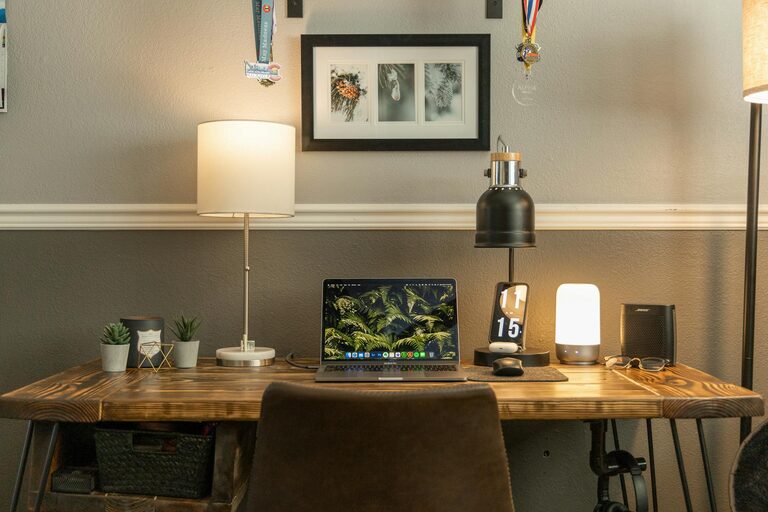
Creating a home workspace that is both cozy and functional can significantly boost your productivity and well-being. Whether you work remotely full-time or need a dedicated spot for occasional tasks, a thoughtfully designed workspace helps you stay focused, organized, and comfortable. This guide offers practical tips to help you set up a home office that meets your needs and feels inviting.
Choose the Right Location
Consider Natural Light
Select a spot with ample natural light, if possible. Natural light has been shown to improve mood and reduce eye strain. A desk near a window can make your workspace feel more open and refreshing. However, avoid harsh direct sunlight that causes glare on your screens.
Minimize Distractions
Try to find a quiet corner away from high-traffic areas in your home. Noise and interruptions can disrupt concentration. If a separate room is not available, consider noise-canceling headphones or portable screens to create a focused environment.
Invest in Comfortable and Functional Furniture
Ergonomic Chair and Desk
Investing in an ergonomic chair will support your posture and reduce back pain during long working hours. An adjustable desk allows you to customize the height to fit your comfort level. If you can, consider a sit-stand desk to alternate between sitting and standing, promoting better circulation.
Desk Size and Storage
Choose a desk large enough to hold your computer, essentials, and a bit of personal space. Incorporate storage solutions like drawers, shelves, or organizers to keep your workspace tidy and clutter-free, which will help maintain focus.
Optimize Lighting
Layered Lighting
In addition to natural light, add layers of artificial lighting. A good overhead light combined with a desk lamp provides flexibility. A lamp with adjustable brightness can help reduce eye strain in the evening or on cloudy days.
Warm Light for Comfort
Choose lighting with a warm color temperature (around 2700K to 3000K) to create a cozy atmosphere. Avoid overly bright or harsh white lights that may cause discomfort or fatigue.
Personalize Your Space
Add Personal Touches
Make your workspace inviting by adding elements you enjoy, such as photos, plants, artwork, or meaningful objects. Personal touches can boost your mood without causing distractions if kept minimal.
Use Color Wisely
Colors impact your emotions and focus. Soft or neutral tones promote calmness and concentration, while pops of vibrant color can stimulate creativity. Choose a color palette that suits your personality and work style.
Keep It Organized
Declutter Regularly
A clutter-free workspace reduces stress and enables better focus. Set aside time weekly to clear unnecessary items and organize essential materials. Use trays, boxes, or containers to group similar items together.
Cable Management
Tidy cables using clips, sleeves, or cable boxes to avoid tangles and maintain a clean look. This simple step also decreases the risk of accidents or damaged equipment.
Incorporate Technology Thoughtfully
Reliable Equipment
Ensure your technology setup, including your computer, internet connection, and peripherals, is reliable and fast. Interruptions caused by technical issues can be frustrating and reduce efficiency.
Smart Accessories
Accessories like an external monitor, keyboard, or mouse can improve ergonomics and make your tasks easier and faster. Wireless devices help reduce cable clutter and increase freedom of movement.
Create a Comfortable Atmosphere
Temperature Control
Maintain a comfortable temperature in your workspace. If the area tends to be too hot or cold, consider portable fans or heaters to create an optimal working environment.
Comfortable Flooring and Seating Area
If space allows, add a small rug or cushioned mat for added comfort underfoot. A separate seating area with a cozy chair can be a perfect spot for reading or taking short breaks away from your desk.
Set Boundaries and Routine
Define Work Hours
Establish start and finish times to help separate work from personal life. A clear schedule, combined with a dedicated workspace, makes it easier to maintain balance.
Take Breaks
Schedule regular breaks to stretch, walk, or relax your eyes. Moving away from the desk periodically increases productivity and reduces fatigue.
—
Designing a cozy and functional home workspace doesn’t require a major renovation. With thoughtful planning and small adjustments, you can create an environment that supports your productivity and comfort. Focus on lighting, furniture, organization, and personalization to make your workspace a place you enjoy spending time in every day.